


We’re employee-owned, every team member you work with brings the mindset of a business owner.

Alan Coleman, CEO


It’s OK, you’re amongst friends here. You can admit that you’ve been putting off migrating your site to HTTPS. Can’t say we blame you as it’s a bit of a task. We know because we’ve done it countless times before and we’re battening down the hatches to do it a lot more in the near future.
Google has blanket-bombed the non-HTTPS offenders of the world with a warning. Here’s what you need to know.
We’ve gone through the difference between HTTP and HTTPS before so we won’t repeat ourselves.
Another thing we’ve been harping on about in the past is Google Search Console. You should definitely have this set up by now as it gives you a wealth of information on how your site is performing in Google SERPs.
In 2016, Search Console also brought the less welcome notification that Google would soon be publically shaming sites that collect payment method data and passwords from users on non-HTTPS connections. Little under a year later and Google is plotting to release their second wave of warnings.
The new warning is part of a long term plan to mark all pages served over HTTP as ‘NOT SECURE’ to users browsing the web through Google’s Chrome Chrome browser when it updates to Chrome 62. For some added context, the vast majority of of web browsing is done through Chrome as it’s the browser choice for 45% of internet users.
Here's their latest warning email:
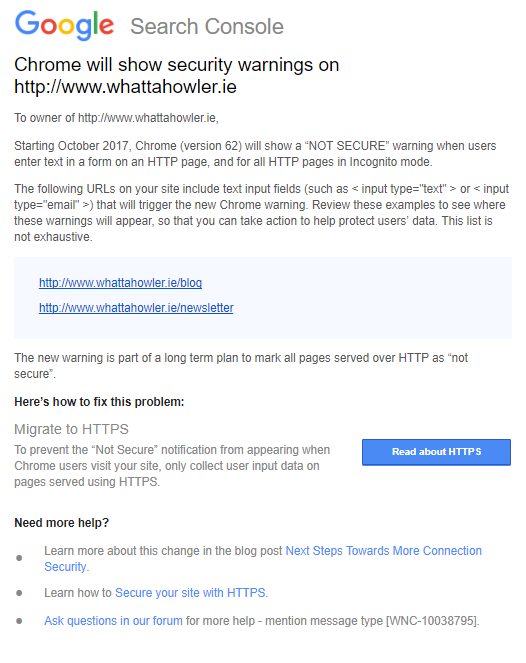
While Google’s initial focus was shaming websites for collecting sensitive payment and password data through non-HTTPS connections, they’ve now expanded their view. From October 2017, sites collecting personal data, which will now include email addresses on non-HTTPS connections will be branded with a big ol’ ‘NOT SECURE’ warning as soon as users interact with a form.
Google will show the ‘NOT SECURE’ warning on pages which contain HTML form elements including < input type="text" >. This code often appears site search functionality which means nearly every page on a site that offers site search will display a ‘NOT SECURE’ warning from October.
We ran a straw poll across a wide variety of Irish e-commerce sites checking both site search availability and whether they served content through HTTP or HTTPS. We found that 72% of e-commerce sites in Ireland offer site search and at least 50% of all e-commerce sites we checked will display Google’s ‘NOT SECURE’ warning to their visitors from October.
So what? That won’t impact my organic traffic, will it?
Google’s warning will only appear in Chrome and will only appear after a page has loaded. Because the warning is not SERP based, your site is unlikely to experience a drop in organic traffic because of the warning. What you are much more likely to see are increased bounce rates and exit rates along with decreased conversion rates where your conversions are measuring e-commerce and form based goal submissions.
If you were just about to hand over your personal information in a traditional bricks ’n’ mortar store, you’d think twice if someone started yelling “NOT SECURE” you might think twice.
Okay, fair enough. That’s a bit unrealistic but at the same time, online conversions can be delicate and the smallest barrier can deter people from converting. We recently looked at the importance of building an owned audience. Any friction in that process at all will greatly reduce the number of people that hand over their personal details, including their email address, to you in future.
If you were to jump into your Google Analytics right now and see that you have a high share of traffic from mobile, specifically Android, migrating to HTTPS should jump to the top of your priorities as this i a prime device to see the warning.
If you haven’t migrated to HTTPS already, you really are putting off the inevitable. In Google’s own words, the “long term plan to mark all pages served over HTTP as “‘not secure’”. We’re moving towards an online world where all pages will be secured so stop putting it off.
Migrating to HTTPS is a daunting task for most online businesses who are anxious that it may lead to losses of revenue and traffic. At Wolfgang Essentials, we showed that these are very real risks that we deal with on a regular basis. When you’re planning your migration to HTTPS be sure to include experienced SEOs in the process from the very start.

Once you’ve made the leap to HTTPS, it’s important to ensure that you’ve verified the secure version of your site within Google Search Console. In fact, you should actually have all four possible domain versions of your site verified. They are:
Here’s what they look like:
-w600.png)
Once HTTPS is in place, you should also log into Google Analytics and ensure that the default tracking domain is set to the HTTPS version. Failing to do this means you risk losing out on valid, secure tracking data:
-w600.png)
If you wanna go full-nerd and aim for the strongest level of SSL compliance, we strongly recommend implementing HSTS headers on your newly-secured HTTPS domain.
HSTS carries out three primary functions:
HSTS is basically like a 301 redirect, but at the browser level, rather than the web page level. It’s superior to a 301 redirect as it can be implemented to always only force use of HTTPS, whereas 301 redirects are deemed unsecure when the pre-redirect HTTP elements first seen by a browser or web crawler.
Here are the four steps you need to follow when implementing HSTS:
There are three options that we will look at now from least secure to most secure. The header you will set to enable HSTS has some variables that are very important.
Strict-Transport-Security: max-age=10886400
This example is the simplest version of this header.
Fairly secure - ensures subdomains will be HTTPS
Strict-Transport-Security: max-age=10886400; includeSubDomains
This is a more secure version of this header.
Strict-Transport-Security: max-age=10886400; includeSubDomains; preload
This is the most secure version of this header and the one we recommend.
This header can be included in the preloading lists maintained by Google.
Once you know the settings you require you can add the header.
Add the Strict-Transport-Security header in the same manner as adding any header.
If you are using the .htaccess file for your configurations, HSTS can be added by using the following code:
<IfModule mod_headers.c>
Header set Strict-Transport-Security "max-age=10886400; includeSubDomains; preload"
</IfModule>
Important: The above code is the most secure and has all required elements needed to be included in the HSTS preload list. This recommended setting will be used in all further examples.
If you’re unsure what server you’re using, you probably shouldn’t be doing this work but you can, of course, use the excellent BuiltWith Browser Extension to identify your server and apply the applicable approach for your site infrastructure.
Header always set Strict-Transport-Security "max-
age=10886400; includeSubdomains; preload"
add_header Strict-Transport-Security "max-age=10886400;
includeSubdomains; preload"
After HSTS is enabled on your site, you will need to get on the preload list maintained by Chrome (this list is also used by other browsers).
If a site sends the preload directive in an HSTS header, it is considered be requesting inclusion in the preload list and may be submitted via the form on this site.
In order to be accepted to the HSTS preload list through this form, your site must satisfy the following set of requirements:
Once you do you will receive different responses depending on your scenario. If you do not meet the requirements, it will tell you. If you do meet them, it will tell you that too.
Getting on the list is a long process, expect weeks to get accepted, and then months to get live to the latest versions of Chrome / Firefox.
After it accepts your domain name, you can check back to see the status of your domain and test your website SSL certificate.
Google is on a mission to secure the web. Their long-term strategy is to achieve this is shaming sites into adopting HTTPS. The migration process might be daunting but it’s inevitable. We’ve shown you how it’s done but reduce the stress in your life by leveraging experienced SEOs throughout the process who’ve migrated sites to HTTPS in the past. G’wan, give us a shout.


Partner with a 6x Best Global Agency Winner that's as invested in your growth as you are.


