


We’re employee-owned, every team member you work with brings the mindset of a business owner.

Alan Coleman, CEO


Howrya peeps. Here we are in the month of my birth! Another year older, another year wiser. When you get to the bottom of the latest SEO Down-Low we hope you will all be a little bit wiser in the art of SEO. November, despite dropping in temperatures outdoors is warming up to be one of the most exciting months in the SEO Down-Low series, released monthly on the Wolfgang Digital Blog.
This month we explore Google Analytics and some of the gems that you can use to get more out of the data available from the visitors of your site. At Wolfgang, we believe that there is absolutely no point in having oodles of data if you don’t know how to access it and turn those awesome insights into amazing actions that will help improve everything about your visitor's experience on your site.
We also tease out some magic statistics on voice search that we believe will help inform your own voice search strategy, something we have been raving about for the last couple of years and we are firmly on the eve of a voice search revolution!
Finally, we delve into some more geeky SEO elements, such as the importance of crawl budget and how you as digital marketers can manage this to help bolster your SEO efforts.
We really hope this Down-Low warms you up from the inside. Grab a hot chocolate, wrap a warm blanket around you and enjoy the insights we have in store.
Jumping into Google Analytics can be great fun when all the metrics are consistently on the rise, it can also be a daunting place to visit when it is the opposite. But Google Analytics should not just be used as a reporting tool. It should be used as a tool to inform progress, identify issues and help make both your website better whilst informing how you make your digital marketing strategy stronger and grow in the right direction.
The following section of the Down-Low focuses on a few advanced tactics that can and will help do both of the above.
First and foremost, at Wolfgang, we always ensure that our clients link their Google Analytics and Google Search Console accounts, now we don’t do this for the fun of it.
We do it because of the way we can enhance the information on offer, by linking both tools. Google Search Console is primarily a webmaster tool, this was its old name, and you may hear many a seasoned SEO call it ‘Google Webmaster Tools’.
Follow our quick guide to link these two properties using the following steps.
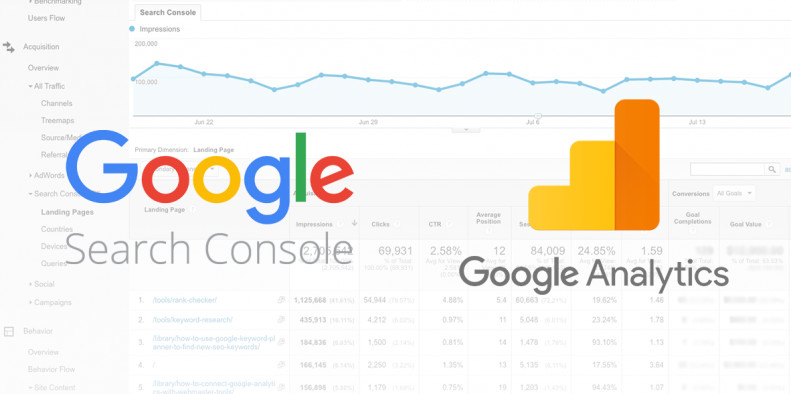
Linking takes about 48 hours, and you will be able to access a wealth of information from within your Google Analytics views. Google Search Console only offers data up to 90 days retrospectively, this is, however, very valuable for SEO’s and webmasters alike.
There are four reports that you can access once you have linked both accounts:
All of the above are self-explanatory and the only data they provide is from Organic Traffic. So, get the two accounts linked and start exploring rich, relevant information about the queries that are driving traffic, the top performing pages on your site, where your visitors are coming from and what types of devices are driving the real valuable traffic to your website.
Get deeper into your organic traffic analysis and identify the actual pages that are driving your organic strategy. To explore this information is quite simple, once you get into the habit of it you will be able to monitor your website pages more granularly and place much valuable time on improving the high performers and also grab that low hanging fruit, give these pages some love and attention to bring them up the ranks and begin performing adequately for you.
To build out the Organic Landing Page Traffic Report in Google Analytics, simply follow these steps:
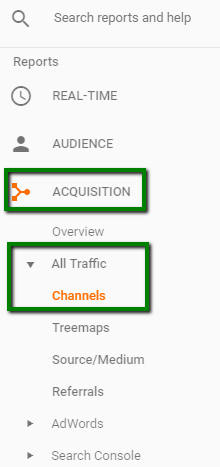
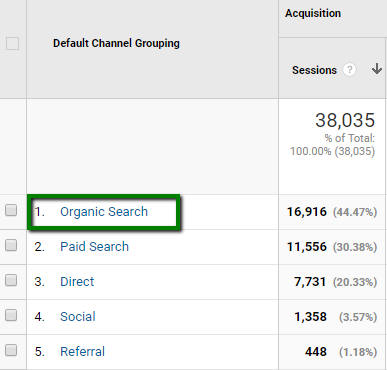
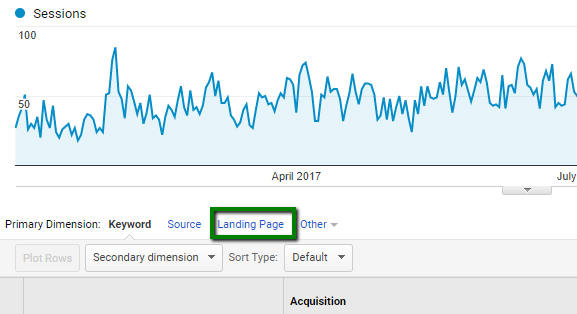
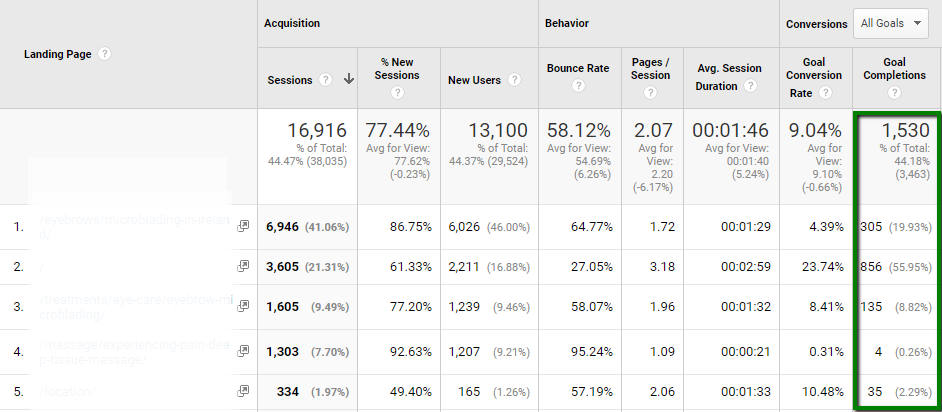
This will now give you a full insight into the Top Performing Organic Landing Pages on your website. Now it’s up to you to jump in there and make all the lower performing pages deliver improved results based on this data.
Google has created a real treat for e-Commerce digital marketers, by offering the option to create bespoke formulas, to focus on the exact information required. We have broken out four potential calculations that you can set up in your own Analytics account today, to get more informed information on your website's performance. We must thank Avinash Kaushik for the insights. So let’s dive in now….
Simply follow the guides below to create your new and more accurate metrics.
Go to: Admin > Select View > Calculated Metrics > New Calculated Metric
Within Google Analytics, the default conversion rate is calculated based on the total number of sessions, this particular metric is not accurate because users do not convert from the first session and sometimes they need more sessions (more than often the case) than one to convert.
However, by creating this metric you can see the exact conversion rate per user, which will give you better insights into what works best for you.
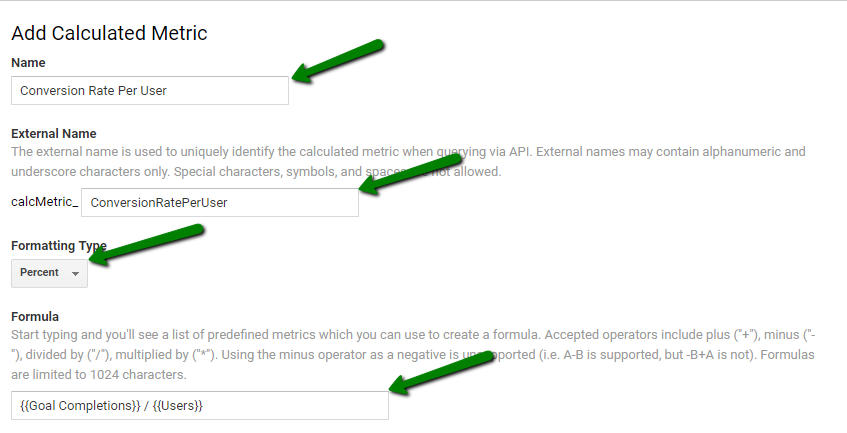
Similar to the Conversion Rate Per User calculated metric, if you have an E-commerce site, you can use Transactions per user instead to fuel your data analysis:
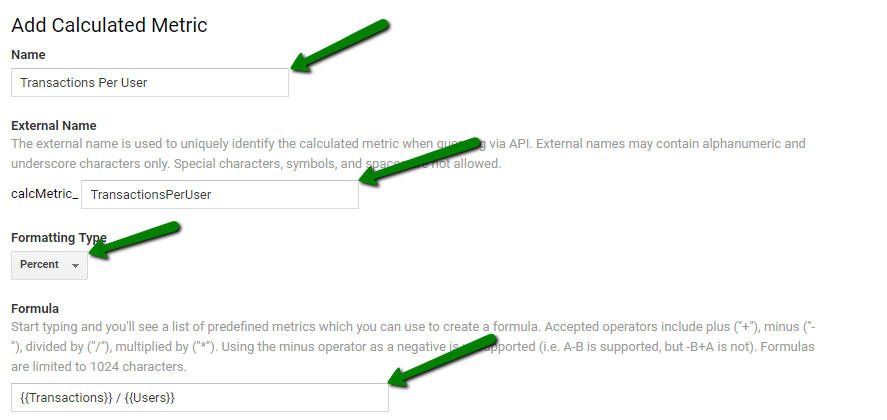
And here is another useful calculated metric, Revenue per user, this will help you drill down and view the average revenue for each visitor instead of looking at the less accurate default revenue reports:
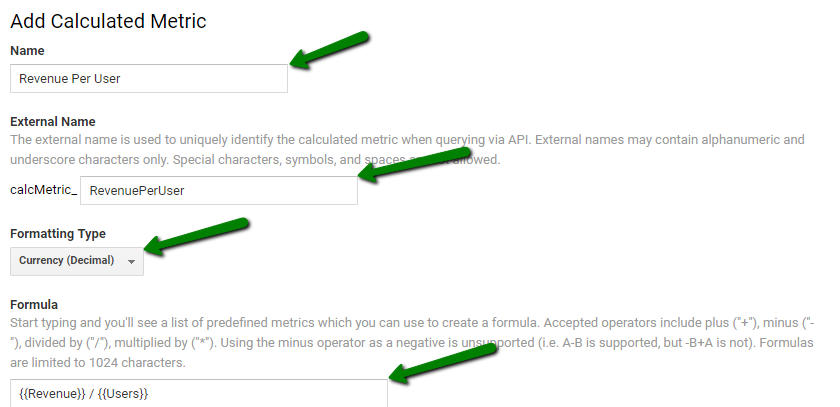
Finally, now that you are delving deeper into the revenue stats, here is another example that Avinash recommends, Calculated Profit, this shows the profit from particular products or services sold on your website:
This example uses 30% as the profit margin, however, you will have to identify your profit margin and replace it in the formula.
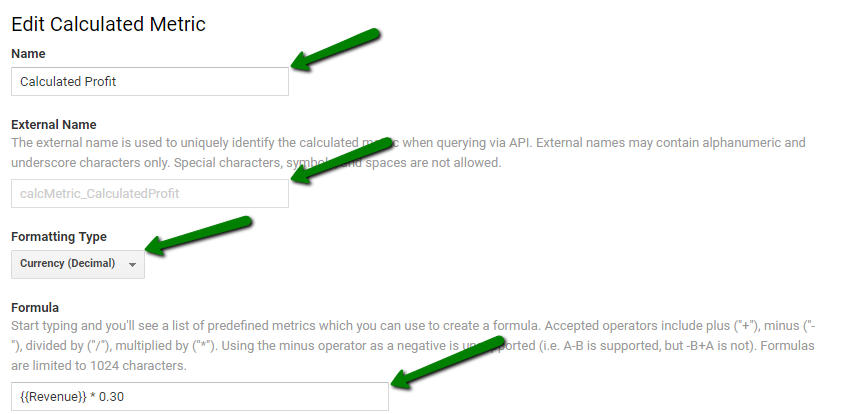
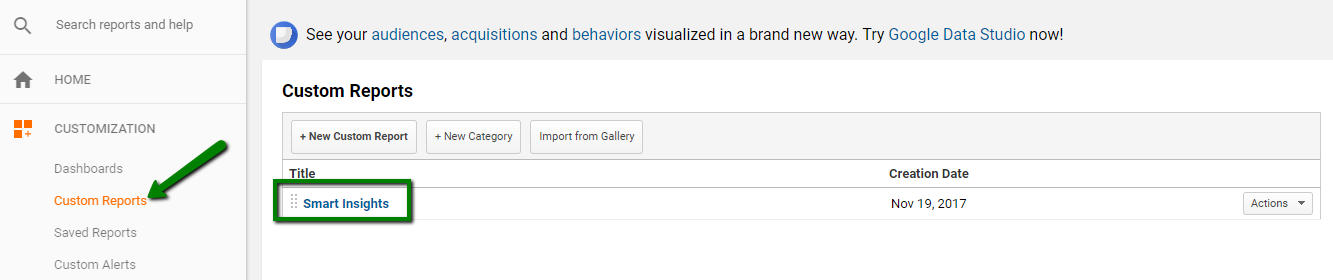
Setting up your custom report for future access to this savage data:

As I said earlier, this is the month of my birth, and guess what I picked up for my birthday? The Google Home. Why? A couple of reasons, firstly, it is equipped with a savage speaker and I wanted to have access to every song you can imagine. For example, by simply saying ‘Okay Google, play Ian Brown - F.E.A.R’ I get the song of choice, no cd’s, radio stations or any hassle.
Secondly, I want to stay up with the rapidly evolving changes in digital marketing and how better to understand voice search, than to engage in it on a daily basis.
Finally, if I am going to be optimising sites for voice search, I need to understand how I ‘as a searcher’ will ask the questions and what I expect to get back in response to these. I have to admit, it is epic, and I am back listening to music I haven’t heard in years (scratched cd’s etc.) I am constantly learning how best to ask questions, to get the answer I want, but most of all, I am learning where the gaps are in Irish websites offering results when I ask questions. And to be bluntly honest, there is a massive gap here that needs to be filled rapidly.
Well if my advocacy towards a Google Home, which is only one space where this technology is being implemented (also smartphones, speakers, vehicles, appliances, wearables and more.) Here are some serious stats, recently released by eMarketer in the US.
Looking to buy a Google Home in Ireland?
One of the most important elements of SEO (Search Engine Optimisation) is the management of how your website is crawled by the search engines. For small websites, this is not as important as it is for larger sites such as some of our big E-commerce clients.
Using the earlier identified Google Search Console tool, and understanding how some of the following concepts are impacting your site can help with how you manage crawl budget:
Here is how you should be collecting data about a Website’s crawl:
There is a lot to get your teeth around here, so why don’t you get in touch with the Wolfgang Digital SEO team to deep dive your site and manage how the search engines crawl your website.
Until next month, stay geeky!


Partner with a 6x Best Global Agency Winner that's as invested in your growth as you are.


